

こんにちは、AI_LABの緒方です。
今回は、フロントエンドにDify、バックエンドにさくらのAI Engineを用いて、RAGを搭載したチャットボットを実装してみました。
以前のプロジェクト「DifyとAzure AI SearchでRAG活用AIを作成してみた」では、 フロントエンドにDify、バックエンドにはAzure OpenAIとAzure AI Searchを用いてRAGを実装したチャットボットを制作しましたが、 本プロジェクトではさくらのAI Engineが提供するモデル・RAGの機能を使うように変更した形となります。
目次
プロジェクトの目的
先述した通り、以前のプロジェクトではAzure OpenAIやAzure AI SearchなどのAzureサービスを利用していましたが、 コスト削減の観点から、さくらのAI Engineを利用して同様のチャットボットを構築することを目標としました。
開発環境
Dify
Difyは、ノーコードでAIエージェントを構築できるオープンソースのプラットフォームです。
UI上でLLMの設定やワークフローを組み立てることができ、チャットボットの開発・検証を迅速に行えます。
さくらのAI Engine
さくらのAI Engineでは、gpt-oss-120b などの大規模モデルをAPI経由で利用でき、アプリケーション側から手軽にテキスト生成を行うことができます。 また、登録したドキュメントを参照して回答を生成するRAG機能も提供しており、独自データを用いた検索・回答を行えるのが特徴です。
本プロジェクトでは、このAPIおよびRAG機能を組み合わせることで、チャットボットの回答生成とドキュメント検索を実現しました。
実装手順
簡単なチャットボットの実装
まずは、「Dify で『さくらのAI Engine』用カスタムツール(プラグイン)を作って呼び出してみた」を参照し、DifyとさくらのAI Engineを用いた簡単なチャットボットを作ることができるプロトタイプを構築しました。 (なお、今回のプロジェクトではローカル版のDifyを利用しました。)
すると、以下のような問題が生じました。
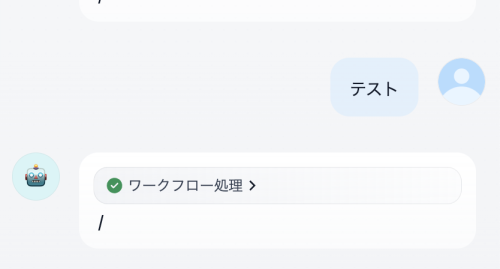
こちらの問いかけに対し、空白や「/」を返してしまっています。
AIの出力したjsonを確認したところ、以下のようになっていました。 本来はAIの回答内容がjsonフィールドに返ってきて欲しいのですが、全てtextフィールドに返ってきていることが判明しました。
{
  "text": "{\"id\": \"(略)\", \"object\": \"chat.completion\", \"created\": 1762761411, \"model\": \"gpt-oss-120b\", \"choices\": [{\"index\": 0, \"message\": {\"role\": \"assistant\", \"content\": \"テスト、受け取りました!何かお手伝いできることがあれば、遠慮なくお知らせください。\", \"refusal\": null, \"annotations\": null, \"audio\": null, \"function_call\": null, \"tool_calls\": [], \"reasoning_content\": \"The user wrote \\\"テスト}}\\\" in Japanese meaning \\\"test}}\\\"? Possibly they are testing the system. The assistant should respond appropriately. Probably just reply \\\"テスト\\\" or confirm. The user gave no instruction. So respond politely.\"}, \"logprobs\": null, \"finish_reason\": \"stop\", \"stop_reason\": null, \"token_ids\": null}], \"service_tier\": null, \"system_fingerprint\": null, \"usage\": {\"prompt_tokens\": 72, \"total_tokens\": 158, \"completion_tokens\": 86, \"prompt_tokens_details\": null}, \"prompt_logprobs\": null, \"prompt_token_ids\": null, \"kv_transfer_params\": null}",
  "files": [],
  "json": []
}
作成したDifyのチャットフローでは、jsonフィールドに返ってきた内容を処理し回答としているため、 AIから上記のような返答を受け取ると、空白や「/」という回答になってしまいます。
(なお、Dify v1.9.2を用いて検証したところ、同様の問題は発生しませんでした。)
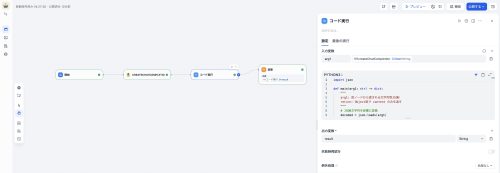
そこで、カスタムツールブロックから受け取ったJSONのうち、textフィールドに返ってきた内容から必要な部分を抽出するコード実行ブロックを組み合わせることで、 AIの回答を適切に表示できるようにしました。 コード実行ブロックで用いたコードは以下の通りです。
import json

def main(arg1: str) -> dict:
    """
    arg1: 前ノードから渡される文字列型JSON
    return: Object型で content のみを返す
    """
    # JSON文字列を辞書に変換
    decoded = json.loads(arg1)

    # content 部分のみを抽出
    content_only = decoded["choices"][0]["message"]["content"]

    # Object型で返却
    return {"result": content_only}
チャットフローは以下のようになりました。
さくらのAI Engineが提供するRAGの導入
次に、さくらのAI Engineが提供するRAGの機能を、Difyと組み合わせることができるプロトタイプを構築しました。
まずは、以下のコマンドでさくらのAI Engine上にドキュメントを登録します。
(注:さくらのAI Engine上にドキュメントを登録する場合、料金が発生します。ご自身でご確認の上登録するようにしてください。)
docker % curl --request POST \
 --url https://api.ai.sakura.ad.jp/v1/documents/upload/ \
 --header 'Accept: application/json' \
 --header 'Authorization: Bearer <トークン> \
 --header 'Content-Type: multipart/form-data' \
 --form "file=@<登録したいファイルの絶対パス>"
{"id":"(略)","status":"pending","content":"","name":"<ドキュメント名>","tags":[],"model":"multilingual-e5-large"}%
登録したドキュメントを参照した回答を行えるようにチャットフローを修正したところ、以下のような形になりました。

各ブロックの概要は以下の通りです。
1つ目のカスタムツール(sakura_rag_chat)
さくらのAI Engineに登録したドキュメントを参照し、ユーザーの質問に関連する情報を取得します。
スキーマは以下のようになりました。
{
  "openapi": "3.0.0",
  "info": {
    "title": "Sakura AI RAG Chat Integration",
    "version": "1.0.0"
  },
  "servers": [
    {
      "url": "https://api.ai.sakura.ad.jp/v1"
    }
  ],
  "paths": {
    "/documents/chat/": {
      "post": {
        "operationId": "sakura_rag_chat",
        "requestBody": {
          "required": true,
          "content": {
            "application/json": {
              "schema": {
                "$ref": "#/components/schemas/InputData"
              }
            }
          }
        },
        "responses": {
          "200": {
            "description": "RAG search and chat response",
            "content": {
              "application/json": {
                "schema": {
                  "type": "object"
                }
              }
            }
          }
        }
      }
    }
  },
  "components": {
    "schemas": {
      "InputData": {
        "type": "object",
        "properties": {
          "query": {
            "type": "string",
            "description": "ユーザーの質問文"
          },
          "model": {
            "type": "string",
            "description": "検索に使用する埋め込みモデル",
            "default": "multilingual-e5-large"
          },
          "chat_model": {
            "type": "string",
            "description": "回答生成に使用する LLM",
            "default": "gpt-oss-120b"
          },
          "top_k": {
            "type": "integer",
            "description": "検索する上位件数",
            "default": 3
          },
          "threshold": {
            "type": "number",
            "description": "類似度スコアの閾値",
            "default": 0.3
          }
        },
        "required": ["query"]
      }
    }
  }
}
1つ目のコード実行ブロック
ユーザーの質問と取得したコンテクスト等を合わせ、次のカスタムツールノードでAIに送るmessagesを整形します。
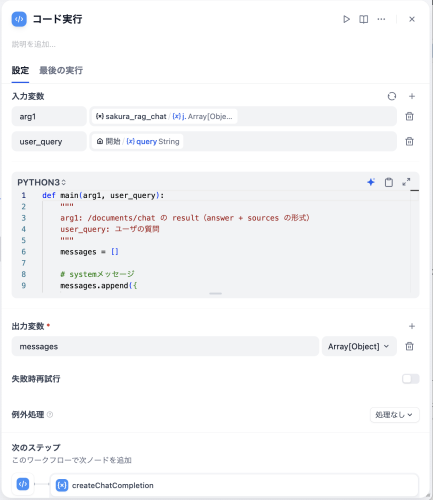
def main(arg1, user_query):
    """
    arg1: /documents/chat の result(answer + sources の形式)
    user_query: ユーザの質問
    """
    messages = []

    # systemメッセージ
    messages.append({
        "role": "system",
        "content": (
            "あなたは優秀なアシスタントです。ユーザーの質問に対し、自然な日本語で回答してください。"
            "コンテキストを参照し、そこにある情報に基づいて回答してください。"
            "コンテクストにない情報については、勝手に内容を補わず、コンテキストからは読み取れない旨返答してください。"
        )
    })

    context_pieces = []
    for item in arg1 or []:

        # ① 単純に sources[].content を全部集める(今回の入力はこれでOK)
        if isinstance(item, dict) and item.get("sources"):
            for src in item.get("sources", []):
                if isinstance(src, dict) and src.get("content"):
                    context_pieces.append(src["content"])

        # ② 念のため answer も補助的に追加(必要であれば)
        elif isinstance(item, dict) and item.get("answer"):
            context_pieces.append(item["answer"])

    # 区切りを入れて結合(元コードを踏襲)
    context_content = "\n\n---\n\n".join(context_pieces)

    # context をメッセージに設定
    messages.append({
        "role": "user",
        "content": f"以下の情報を参考にしてください:\n{context_content}"
    })

    # 実際の質問
    messages.append({
        "role": "user",
        "content": user_query
    })

    return {"messages": messages}
2つ目のカスタムツール(createChatCompletion)
AIにユーザーの質問とコンテクストを渡し、回答を受け取ります。 スキーマは以下の通りです。
openapi: 3.0.3
info:
  title: Sakura AI - Chat Completions (Dify Tool)
  version: 1.0.0
  description: >
    Sakura AI の Chat Completions エンドポイントを Dify の Custom Tool として呼び出します。
    返却 JSON の choices[0].message.content をワークフロー側で text にマップしてください。
servers:
  - url: https://api.ai.sakura.ad.jp
paths:
  /v1/chat/completions:
    post:
      summary: Create chat completion
      operationId: createChatCompletion
      security:
        - ApiKeyAuth: []
      requestBody:
        required: true
        content:
          application/json:
            schema:
              $ref: '#/components/schemas/ChatRequest'
            examples:
              sample:
                value:
                  model: gpt-oss-120b
                  messages:
                    - role: system
                      content: "こんにちは!"
                  temperature: 0.7
                  max_tokens: 200
                  stream: false
      responses:
        '200':
          description: OK
          content:
            application/json:
              schema:
                $ref: '#/components/schemas/ChatResponse'
components:
  securitySchemes:
    ApiKeyAuth:
      type: apiKey
      in: header
      name: Authorization
      description: 'Set as: Bearer <Token>'
  schemas:
    Message:
      type: object
      required: [role, content]
      properties:
        role:
          type: string
          enum: [system, user, assistant]
        content:
          type: string
    ChatRequest:
      type: object
      required: [model, messages]
      properties:
        model:
          type: string
          example: gpt-oss-120b
        messages:
          type: array
          items:
            $ref: '#/components/schemas/Message'
        temperature:
          type: number
          format: float
          default: 0.7
        max_tokens:
          type: integer
          default: 200
        stream:
          type: boolean
          default: false
    ChatResponse:
      type: object
      properties:
        id:
          type: string
        object:
          type: string
          example: chat.completion
        created:
          type: integer
        model:
          type: string
        choices:
          type: array
          items:
            type: object
            properties:
              index:
                type: integer
              message:
                type: object
                properties:
                  role:
                    type: string
                  content:
                    type: string
                  refusal:
                    nullable: true
                  annotations:
                    nullable: true
                  audio:
                    nullable: true
                  function_call:
                    nullable: true
                  tool_calls:
                    type: array
                    items: {}
                  reasoning_content:
                    type: string
                    nullable: true
              logprobs:
                nullable: true
              finish_reason:
                type: string
                nullable: true
              stop_reason:
                nullable: true
        service_tier:
          nullable: true
        system_fingerprint:
          nullable: true
        usage:
          type: object
          properties:
            prompt_tokens:
              type: integer
            completion_tokens:
              type: integer
            total_tokens:
              type: integer
2つ目のコード実行ブロック
AIからの回答を整形し、回答ノードで出力できるようにします。
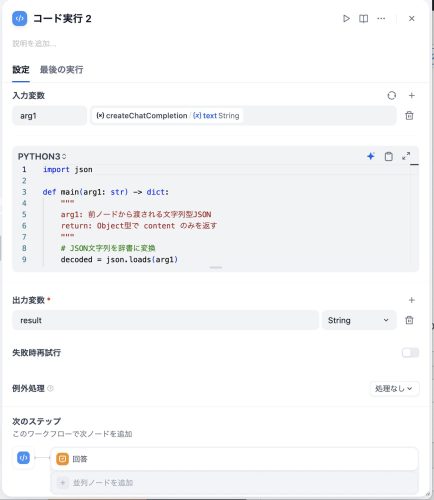
import json

def main(arg1: str) -> dict:
    """
    arg1: 前ノードから渡される文字列型JSON
    return: Object型で content のみを返す
    """
    # JSON文字列を辞書に変換
    decoded = json.loads(arg1)

    # content 部分のみを抽出
    content_only = decoded["choices"][0]["message"]["reasoning_content"]

    # Object型で返却
    return {"result": content_only}
まとめ
今回のプロジェクトでは、DifyとさくらのAI Engineを組み合わせることで、Azure OpenAIやAzure AI SearchなどのAzureサービスに依存しないRAG搭載チャットボットを構築しました。
今後は、RAGの性能の検証や最適化を進め、より精度の高い応答が可能な仕組みへと改善していく予定です。


