
こんにちは、AI_LABの馬場光希です。
今回は、Azure Open AI x OpenTofuを利用することで、IaC(Infracture as Code)自動化を検証してみました。
▼ 以前の課題
以前、クラウド事業ではお客様の要件に基づき、全て手作業でサーバーを構築していました。 これには「1台構成」や「冗長化構成」など複数のパターンがあり、構築に時間がかかるだけでなく、手作業によるコピーミスなども課題となっていました。
また、Town側で暗黙のルールとして設定している静的な項目もありますが、お客様によって変化する動的な項目もあったりするため、かなり区別が難しく、時間がかかってしまう作業となってしまっていました。
▼ 今回の目標
そこで、このサーバー構築プロセスをIaC(Infrastructure as Code)化し、さらにAIを活用して「要件定義書(CSV)」からIaCの設定ファイル(.tfvars)を自動生成するプロトタイプ開発に挑戦しました。
▼ 結果
最終的に、要件定義書をインプットとして、AIがOpenTofu (Terraform)用の変数ファイルを自動生成し、LocalStack(ローカルAWS環境)へデプロイ検証できる仕組みが完成しました。
暗黙ルールで設定される静的な項目は自動的に設定され、動的な項目は要件定義書から参照されることで、作業メンバーは「動的変数が合っているか?」を再確認するだけで問題なくなりました。
以降は、これらの目的を達成した新しい開発プロセスについて詳しく解説します。
目次
1. AIによるIaC設定ファイルの自動生成アーキテクチャ
概要図
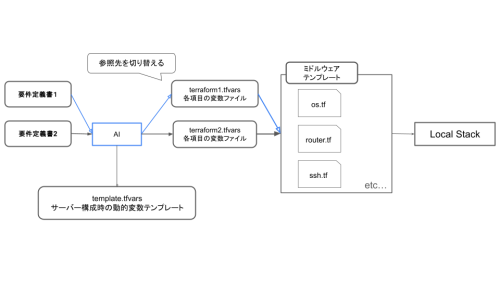
全体の流れは、開発者が用意した「要件定義書.CSV」をPythonスクリプトが読み込み、AIが解釈してtemplate.tfvarsを元に、入力できる変数をterraformNth.tfvarsの設定ファイルを生成し、ローカルのLocalStack環境にデプロイする、というものです。
2.主要技術と選定理由
Python
選定理由: チームメンバーが最も慣れている言語であり、AI のライブラリが豊富なため。
OpenTofu (Terraform)
OpenTofu is an OSS tool for building, changing, and versioning infrastructure safely and efficiently. OpenTofu can manage existing and popular service providers as well as custom in-house solutions.
Terraform からフォークして開発を開始したオープンソースソフトウェア(OSS)です。
選定理由: Townではさくらなど、マルチクラウドを利用するスタンスですので、最も対応数が多く、かつ近年でも更新が続いている OpenTofuを採用することとしました。
また、Terraform/OpenTofuの「ロジック(.tf ファイル)と設定(.tfvars 変数ファイル)を分離する」という設計思想そのものが、今回の要件に完璧に合致していました。
具体的には、variables.tf に「静的なデフォルト値(暗黙ルール)」を持たせ、AIには「動的な変更値(お客様の要件)」だけを .tfvars ファイルとして生成させる、という役割分担を明確にできたのが大きな理由です。
cf2tf
cf2tf is a CLI tool that attempts to convert Cloudformation to Terraform. We say attempt because it’s not really possible to make the conversion with 100% accuracy (currently) because of several reasons mostly around converting a Map value in Cloudformation to the correct value in HCL.
cf2tfは、CloudFormationをTerraformに変換しようとするCLIツールです。変換が100%正確に行えない(現時点では)ため「試みる」と表現されています。
プロジェクトのベースとなる .tf ファイル(図の「ミドルウェアテンプレート」に相当する部分)は、ゼロから作成したわけではありません。
すでにAWS CloudFormationで書かれた既存のCFファイルがあったため、これらをTerraformに自動変換するライブラリ cf2tf を活用しました。
LocalStack
Develop and test your AWS applications locally to reduce development time and increase product velocity. Reduce unnecessary AWS spend and remove the complexity and risk of maintaining AWS dev accounts.
AWS アプリケーションをローカルで開発およびテストすることで、開発時間を短縮し、製品の速度を向上できる。
不要な AWS の支出を削減し、AWS 開発アカウントを維持する複雑さとリスクを排除することができるローカル検証ツールです。
選定理由:
AWSの検証をローカル環境で完結させるため採用しました。
Azure Open AI
「要件定義書(CSV)」を「動的な変数ファイル(.tfvars)」に変換する、プロジェクトの核心部分を担います。
3. AIが「.tfvars」を自動生成する実行フロー
ディレクトリ構造
project_root/
├── client files/
│    └── requirement.csv  (要件定義書)
├── terraform/
│   ├── envs/
│   │    ├── template.tfvars (AI参照のテンプレ)
│   │    └── anken1.tfvars (案件ごとの動的変数ファイル)
│   ├── variables.tf (静的変数ファイル 特定の指定がなければこちらの数値が利用される)
│   ├── EC2_instance.tf
│   ├── EIP.tf
│   ├── IPAssoc.tf
│   ├── provider.tf
│   └── ...
├── main.py              (AI呼び出しスクリプト)
└── ...
動作例
1. client files/ ディレクトリに、決まったフォーマットの「要件定義書(CSV)」を配置します。
2. main.py (Pythonスクリプト)を実行します。
3. スクリプトがCSVを読み込み、AI(LLM)に対して以下の内容のプロンプトを元に出力します。
## 指示

あなたは、与えられた「要件定義書」と「出力テンプレート」に基づいて、`.tfvars` ファイルの内容を生成する専門AIです。
あなたの仕事は、「出力テンプレート」の空欄部分を「要件定義書」から読み取った情報で正確に埋めることです。

## 実行ルール
1.  「出力テンプレート」内の変数名(例: `name_tag`)とコメントをヒントに、「要件定義書」から対応する値を探してください。
2.  要件定義書に記載がない項目は、無理に推測せず `""` を消し `null` と置いてください。
3.  数値が入るべき項目(例: `volume_size`)で要件定義書に記載がない場合は、`10` を設定してください。
4.  テンプレートの構造、コメント、インデントは完全に維持してください。
## 厳守事項
- **出力はテンプレートを埋めたHCLコードのみ**です。
- Markdownのコードブロック(```hclなど)や、その他の説明、コメント、補足は一切含めないでください。
- 出力はテンプレートの最初の行(例: `ec2 = {`)から始まり、最後の行(例: `}`)で終わる必要があります。
- コメントで、どうしてその項目を選択入力したのか?を解説してください。
4. AIが生成したテキスト(.tfvarsの中身)を受け取り、terraform/ ディレクトリ内にファイルとして保存します。
root@bd9ce36d73a0:/workspace# python3 main.py --vars-file requirements/要件定義書_testkun.csv
Azure OpenAIにtfvarsファイルの生成を依頼しています...
----------generated.auto.tfvars----------
# ----------------------------------------------------
# 案件ごとの可変変数(最優先)
# ----------------------------------------------------
# ここで値を指定すると、デフォルト値より優先されます。
# 空文字("") や null のままにすると、デフォルト値が使われます。
# ----------------------------------------------------

# --- EC2  ---
ec2 = {
  name_tag         = "testkun.example"  # ドメイン名に記載されたものを選択

  # 未入力時: static の "m5.xlarge"
  instance_type    = "t3.small"  # サーバー1 の仕様に "t3.small" と明記

  # 未入力時: hard の "ami-000..." (本番の場合 Almalinux9を標準とする)
  image_id         = null  # AMI ID の記載なしのため null

  # 未入力時: hard の "default"
  key_name         = null  # SSH鍵名の記載なしのため null

  # 未入力時: ローカル検証用の vpc.tf の Subnet ID
  subnet_id        = null  # サブネットの記載なしのため null

  # 未入力時: ローカル検証用の vpc.tf の VPC ID
  vpc_id           = null  # VPC ID の記載なしのため null

  # 未入力時: hard の "/dev/xvda"
  device_name      = null  # デバイス名の記載なしのため null

  # 未入力時: hard の 100 (GB)
  volume_size      = 100  # サーバー1 の仕様に "HDD 100GB" とあるため100

  # 未入力時: hard の "standard"
  volume_type      = null  # ボリュームタイプ詳細記載なしのため null
}
5. 生成された .tfvars を確認し、tofu init, tofu plan を実行します。
root@3c2e140210cc:/workspace/aws/terraform# tofu init

Initializing the backend...

Initializing provider plugins...
- Reusing previous version of hashicorp/aws from the dependency lock file
- Installing hashicorp/aws v6.18.0...
- Installed hashicorp/aws v6.18.0 (signed, key ID 0C0AF313E5FD9F80)

Providers are signed by their developers.
If you'd like to know more about provider signing, you can read about it here:
https://opentofu.org/docs/cli/plugins/signing/

OpenTofu has been successfully initialized!

You may now begin working with OpenTofu. Try running "tofu plan" to see
any changes that are required for your infrastructure. All OpenTofu commands
should now work.

If you ever set or change modules or backend configuration for OpenTofu,
rerun this command to reinitialize your working directory. If you forget, other
commands will detect it and remind you to do so if necessary.
root@3c2e140210cc:/workspace/aws/terraform# tofu plan -var-file=envs/test.tfvars

OpenTofu used the selected providers to generate the following execution plan. Resource actions are indicated with the following symbols:
  + create

OpenTofu will perform the following actions:

  # aws_eip.test_eip will be created
  + resource "aws_eip" "test_eip" {
      + allocation_id        = (known after apply)
      + arn                  = (known after apply)
      + association_id       = (known after apply)
      + carrier_ip           = (known after apply)
      + customer_owned_ip    = (known after apply)
      + domain               = "vpc"
      + id                   = (known after apply)
      + instance             = (known after apply)
      + ipam_pool_id         = (known after apply)
      + network_border_group = (known after apply)
      + network_interface    = (known after apply)
      + private_dns          = (known after apply)
      + private_ip           = (known after apply)
      + ptr_record           = (known after apply)
      + public_dns           = (known after apply)
      + public_ip            = (known after apply)
      + public_ipv4_pool     = (known after apply)
      + region               = "ap-northeast-1"
      + tags                 = {
          + "Name" = "testkun.example"
        }
      + tags_all             = {
          + "Name" = "testkun.example"
        }
    }

  # aws_eip_association.ip_assoc will be created
  + resource "aws_eip_association" "ip_assoc" {
      + allocation_id        = (known after apply)
      + id                   = (known after apply)
      + instance_id          = (known after apply)
      + network_interface_id = (known after apply)
      + private_ip_address   = (known after apply)
      + public_ip            = (known after apply)
      + region               = "ap-northeast-1"
    }

  # aws_instance.ec2_instance will be created
  + resource "aws_instance" "ec2_instance" {
      + ami                                  = "ami-00000000000000000"
      + arn                                  = (known after apply)
      + associate_public_ip_address          = (known after apply)
      + availability_zone                    = (known after apply)
      + disable_api_stop                     = (known after apply)
      + disable_api_termination              = true
      + ebs_optimized                        = (known after apply)
      + enable_primary_ipv6                  = (known after apply)
      + force_destroy                        = false
      + get_password_data                    = false
      + host_id                              = (known after apply)
      + host_resource_group_arn              = (known after apply)
      + iam_instance_profile                 = (known after apply)
      + id                                   = (known after apply)
      + instance_initiated_shutdown_behavior = (known after apply)
      + instance_lifecycle                   = (known after apply)
      + instance_state                       = (known after apply)
      + instance_type                        = "t3.small"
      + ipv6_address_count                   = (known after apply)
      + ipv6_addresses                       = (known after apply)
      + key_name                             = "default"
      + monitoring                           = (known after apply)
      + outpost_arn                          = (known after apply)
      + password_data                        = (known after apply)
      + placement_group                      = (known after apply)
      + placement_group_id                   = (known after apply)
      + placement_partition_number           = (known after apply)
      + primary_network_interface_id         = (known after apply)
      + private_dns                          = (known after apply)
      + private_ip                           = (known after apply)
      + public_dns                           = (known after apply)
      + public_ip                            = (known after apply)
      + region                               = "ap-northeast-1"
      + secondary_private_ips                = (known after apply)
      + security_groups                      = (known after apply)
      + source_dest_check                    = true
      + spot_instance_request_id             = (known after apply)
      + subnet_id                            = (known after apply)
      + tags                                 = {
          + "Name" = "testkun.example"
        }
      + tags_all                             = {
          + "Name" = "testkun.example"
        }
      + tenancy                              = (known after apply)
      + user_data_base64                     = (known after apply)
      + user_data_replace_on_change          = false
      + vpc_security_group_ids               = (known after apply)

      + capacity_reservation_specification (known after apply)

      + cpu_options (known after apply)

      + credit_specification {
          + cpu_credits = "standard"
        }

      + ebs_block_device {
          + delete_on_termination = true
          + device_name           = "/dev/xvda"
          + encrypted             = (known after apply)
          + iops                  = (known after apply)
          + kms_key_id            = (known after apply)
          + snapshot_id           = (known after apply)
          + tags_all              = (known after apply)
          + throughput            = (known after apply)
          + volume_id             = (known after apply)
          + volume_size           = 100
          + volume_type           = "standard"
        }

      + enclave_options (known after apply)

      + ephemeral_block_device (known after apply)

      + instance_market_options (known after apply)

      + maintenance_options (known after apply)

      + metadata_options (known after apply)

      + network_interface (known after apply)

      + primary_network_interface (known after apply)

      + private_dns_name_options (known after apply)

      + root_block_device (known after apply)
    }

  # aws_security_group.instance_security_group will be created
  + resource "aws_security_group" "instance_security_group" {
      + arn                    = (known after apply)
      + description            = "Security Group"
      + egress                 = (known after apply)
      + id                     = (known after apply)
      + ingress                = (known after apply)
      + name                   = "testkun.example"
      + name_prefix            = (known after apply)
      + owner_id               = (known after apply)
      + region                 = "ap-northeast-1"
      + revoke_rules_on_delete = false
      + tags                   = {
          + "Name" = "testkun.example"
        }
      + tags_all               = {
          + "Name" = "testkun.example"
        }
      + vpc_id                 = (known after apply)
    }

  # aws_subnet.example will be created
  + resource "aws_subnet" "example" {
      + arn                                            = (known after apply)
      + assign_ipv6_address_on_creation                = false
      + availability_zone                              = (known after apply)
      + availability_zone_id                           = (known after apply)
      + cidr_block                                     = ""
      + enable_dns64                                   = false
      + enable_resource_name_dns_a_record_on_launch    = false
      + enable_resource_name_dns_aaaa_record_on_launch = false
      + id                                             = (known after apply)
      + ipv6_cidr_block_association_id                 = (known after apply)
      + ipv6_native                                    = false
      + map_public_ip_on_launch                        = false
      + owner_id                                       = (known after apply)
      + private_dns_hostname_type_on_launch            = (known after apply)
      + region                                         = "ap-northeast-1"
      + tags                                           = {
          + "Name" = "test-subnet"
        }
      + tags_all                                       = {
          + "Name" = "test-subnet"
        }
      + vpc_id                                         = (known after apply)
    }

  # aws_vpc.main will be created
  + resource "aws_vpc" "main" {
      + arn                                  = (known after apply)
      + cidr_block                           = ""
      + default_network_acl_id               = (known after apply)
      + default_route_table_id               = (known after apply)
      + default_security_group_id            = (known after apply)
      + dhcp_options_id                      = (known after apply)
      + enable_dns_hostnames                 = true
      + enable_dns_support                   = true
      + enable_network_address_usage_metrics = (known after apply)
      + id                                   = (known after apply)
      + instance_tenancy                     = "default"
      + ipv6_association_id                  = (known after apply)
      + ipv6_cidr_block                      = (known after apply)
      + ipv6_cidr_block_network_border_group = (known after apply)
      + main_route_table_id                  = (known after apply)
      + owner_id                             = (known after apply)
      + region                               = "ap-northeast-1"
      + tags                                 = {
          + "Name" = "test-vpc"
        }
      + tags_all                             = {
          + "Name" = "test-vpc"
        }
    }


Plan: 13 to add, 0 to change, 0 to destroy.

────────────────────────────────────────────────────────────────────────────────────────────────────────────────────────────────────────────────────────────────

Note: You didn't use the -out option to save this plan, so OpenTofu can't guarantee to take exactly these actions if you run "tofu apply" now.
一部はセキュリティの観点から削除しています。
6. tofu applyを実行し、LocalStack 上に、CSVの要件に基づいたAWSリソース(EC2, SGなど)が構築されます。
...
Do you want to perform these actions?
  OpenTofu will perform the actions described above.
  Only 'yes' will be accepted to approve.

  Enter a value: yes

aws_eip.test_eip: Creating...
aws_vpc.main: Creating...
aws_eip.test_eip: Creation complete after 2s [id=eipalloc-a80dcfb9bf0efb530]
aws_vpc.main: Still creating... [10s elapsed]
aws_vpc.main: Creation complete after 12s [id=vpc-985e209a0d84e4075]
aws_subnet.example: Creating...
aws_security_group.instance_security_group: Creating...
aws_subnet.example: Creation complete after 0s [id=subnet-754dfd2d64f751079]
aws_security_group.instance_security_group: Creation complete after 0s [id=sg-dba50b9f3f394e9bc]
aws_vpc_security_group_egress_rule.allow_all_outbound: Creating...
aws_vpc_security_group_ingress_rule.allow_http_Alternative: Creating...
aws_instance.ec2_instance: Creating...
aws_vpc_security_group_ingress_rule.allow_http_Alternative_another: Creating...
aws_vpc_security_group_ingress_rule.allow_https: Creating...
aws_vpc_security_group_ingress_rule.allow_ssh_another: Creating...
aws_vpc_security_group_ingress_rule.allow_http: Creating...
aws_vpc_security_group_ingress_rule.allow_ssh: Creating...
aws_vpc_security_group_egress_rule.allow_all_outbound: Creation complete after 0s [id=sgr-d264bfd20e629bcf3]
aws_vpc_security_group_ingress_rule.allow_http_Alternative: Creation complete after 0s [id=sgr-20cc777d70df03231]
aws_vpc_security_group_ingress_rule.allow_http_Alternative_another: Creation complete after 0s [id=sgr-76170082762a8bbbe]
aws_vpc_security_group_ingress_rule.allow_https: Creation complete after 0s [id=sgr-bd286039d1fabcda0]
aws_vpc_security_group_ingress_rule.allow_http: Creation complete after 0s [id=sgr-1c71580c6fdd55ad3]
aws_vpc_security_group_ingress_rule.allow_ssh: Creation complete after 0s [id=sgr-d07f0356832ba8f66]
aws_vpc_security_group_ingress_rule.allow_ssh_another: Creation complete after 0s [id=sgr-c1a54aea81bca8478]
aws_instance.ec2_instance: Still creating... [10s elapsed]
aws_instance.ec2_instance: Creation complete after 10s [id=i-9b1ae51342f21be09]
aws_eip_association.ip_assoc: Creating...
aws_eip_association.ip_assoc: Creation complete after 0s [id=eipassoc-0efcf539e779a9f94]

Apply complete! Resources: 13 added, 0 changed, 0 destroyed.
4. 結論と今後の展望
今回のプロトタイプ開発を通じて、AIとIaCを組み合わせることで、従来のサーバー構築作業を大幅に効率化できる可能性が見えました。
今後は、Phase2で調査した冗長構成など、より複雑なパターンにも対応させていきたいと考えています。
5. 参考リンク
IaCとは?インフラをコード化するメリットと注意点・導入例を紹介!
OpenTofu が正式リリースされたので内容を確認してみました
CloudFormationからTerraformへの変換が超簡単!cf2tfを使ってみた


